Pro · included, not per check

Know who is signing — before the signature goes on

Require a government ID and a selfie before the document unlocks. You compare them against the person on live video and approve — so a lease, a transfer or a six-figure agreement is never signed by whoever happened to have the link.

Government ID + selfie You approve, not an algorithm Every decision audit-logged No per-check fee
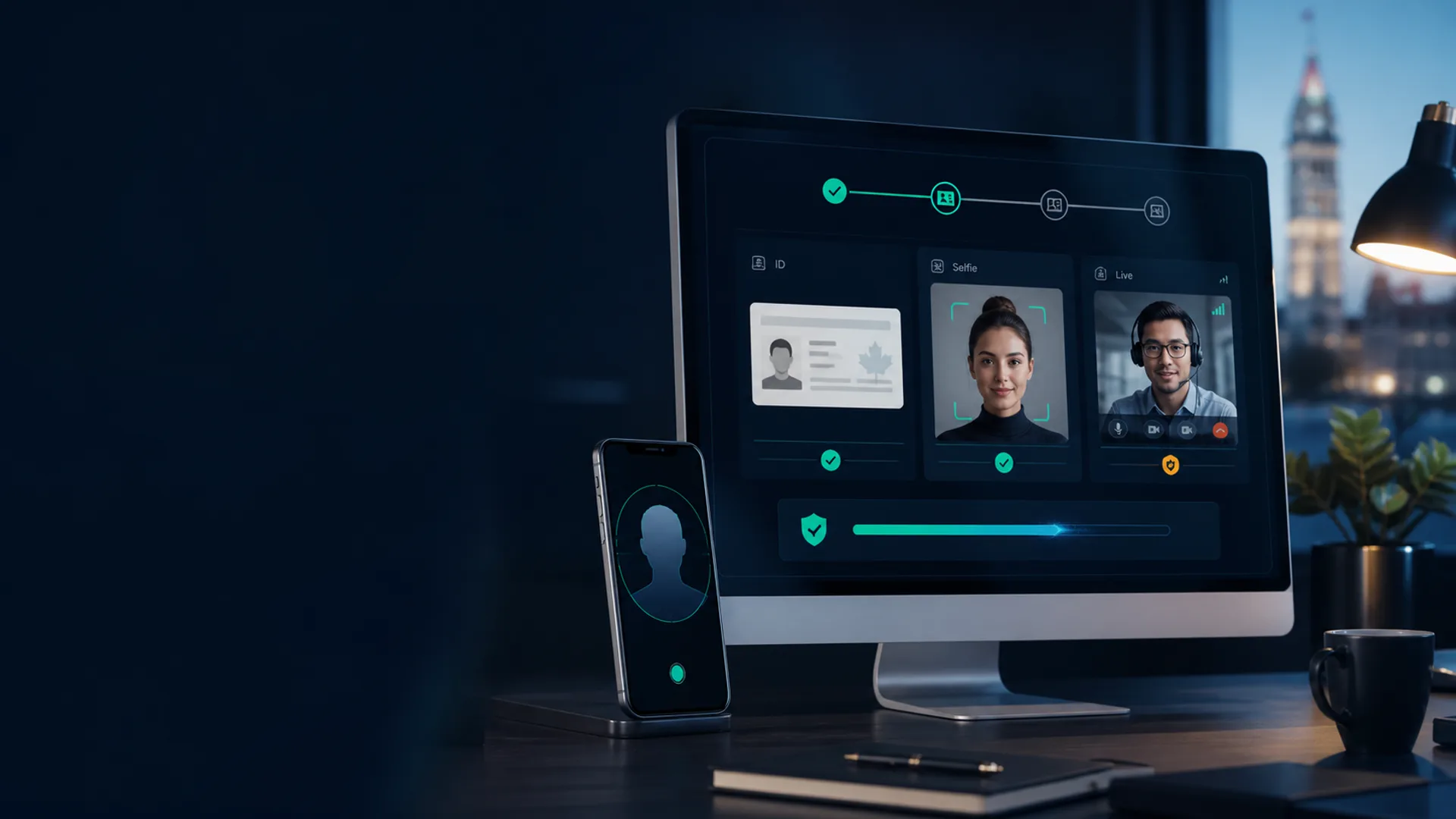
Reviewing a signer's ID and selfie against their live video tile
▶ Watch it work
Verified badgeShown on the signer's tile
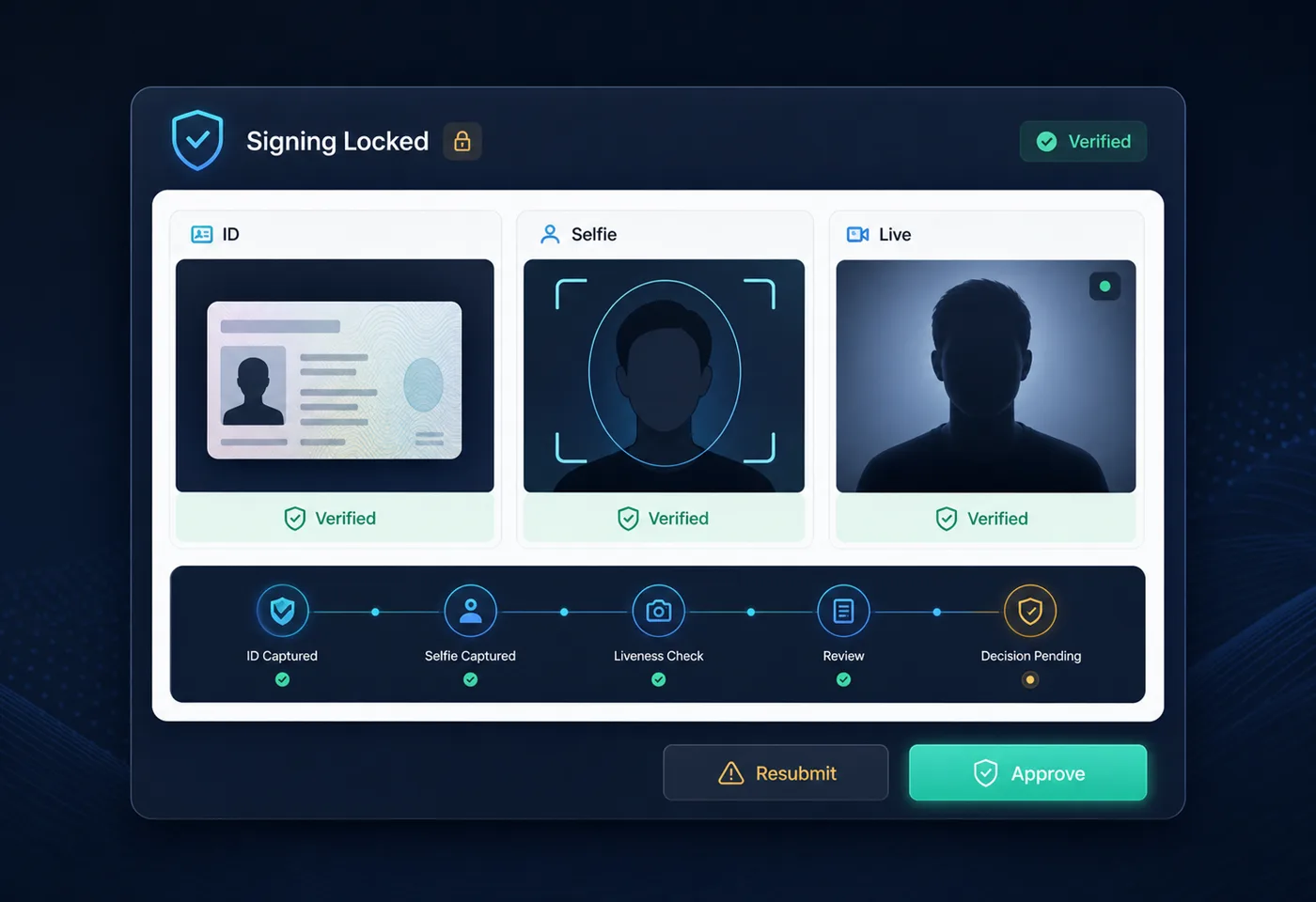
🔒Signing stays lockedUntil you approve

For the signings where the wrong signer would be a disaster

Mortgage & loan documentsReal estate transfersPowers of attorney High-value contractsTenancy agreementsEstate & wills paperwork Corporate resolutionsVehicle & asset sales
Three-part checkID · selfie · live video
Human reviewNo black-box score
Resubmit loopWith a plain-English reason
$0 per checkIncluded with Pro

How it works

Three things line up, then you decide

Identity platforms hand you a score. This hands you the evidence — the document, the face, and the live person — and records the judgement you made.

1

The ID

Your signer photographs a government-issued photo ID — licence, passport, provincial card — with the phone already in their hand. No app, no account, no reader hardware.

Submitted in-browser
2

The selfie

They take a selfie in the signing room itself, at the moment of signing — not a photo from their camera roll taken who-knows-when by who-knows-whom.

Taken live, in session
3

Your review

You see the ID, the selfie and their live video tile side by side, and either approve — a verified badge appears for everyone in the room — or send it back with a reason.

Approve or request resubmit

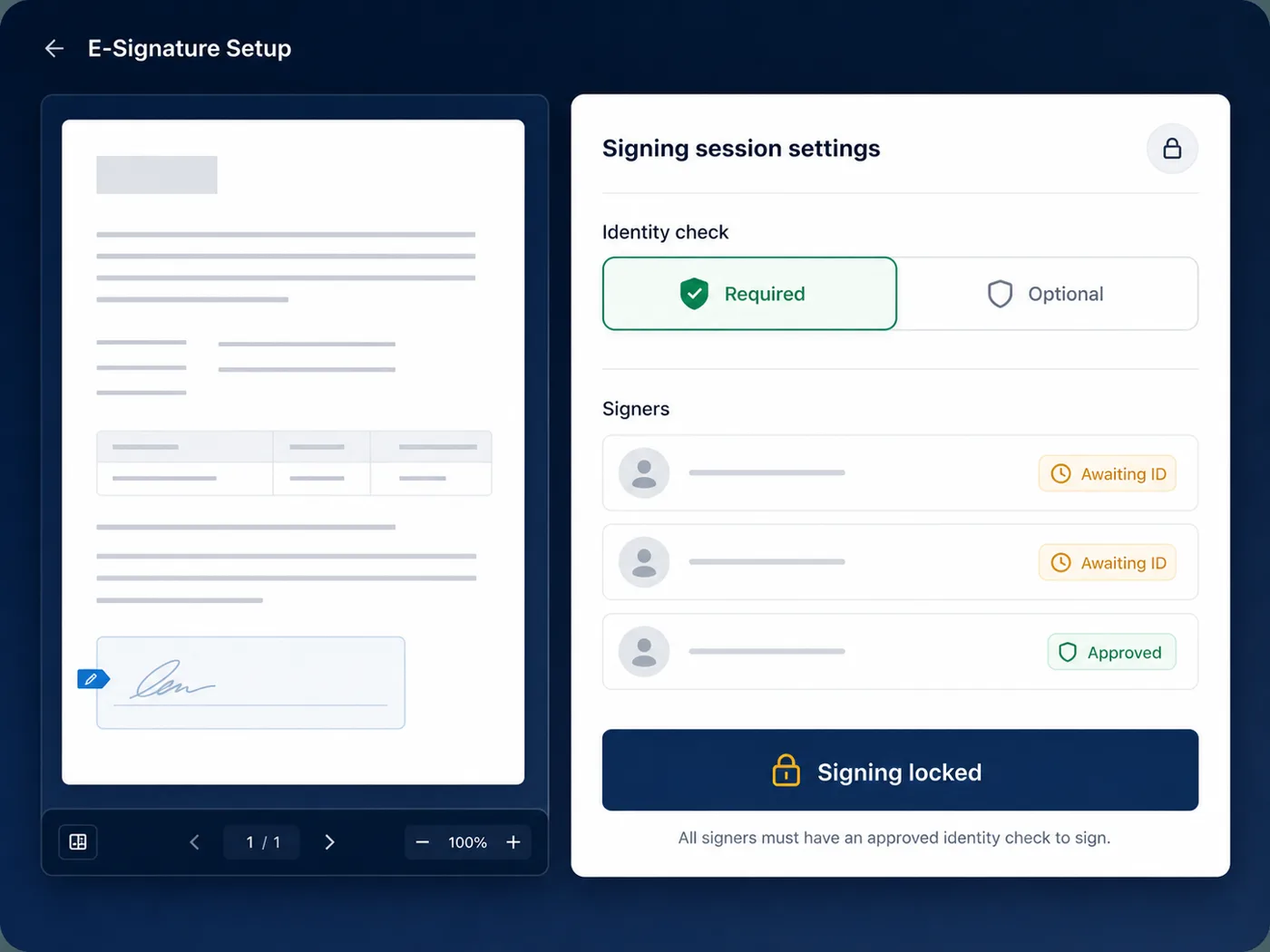
Required or optional

The sign button stays locked until you say so

Set identity checks to Required and nobody can put a signature on the document until you have approved their ID. Set them to Optional and guests join and sign freely. It is a per-session choice, because a $200 waiver and a property transfer do not need the same ceremony.

Signers always see which mode they are in and what is expected of them — no surprise demand for a passport halfway through.

Per-session settingHard lock on signingClear to the signer
See the signing room
Session setting that requires identity verification before signing
▶ Video

The resubmit loop

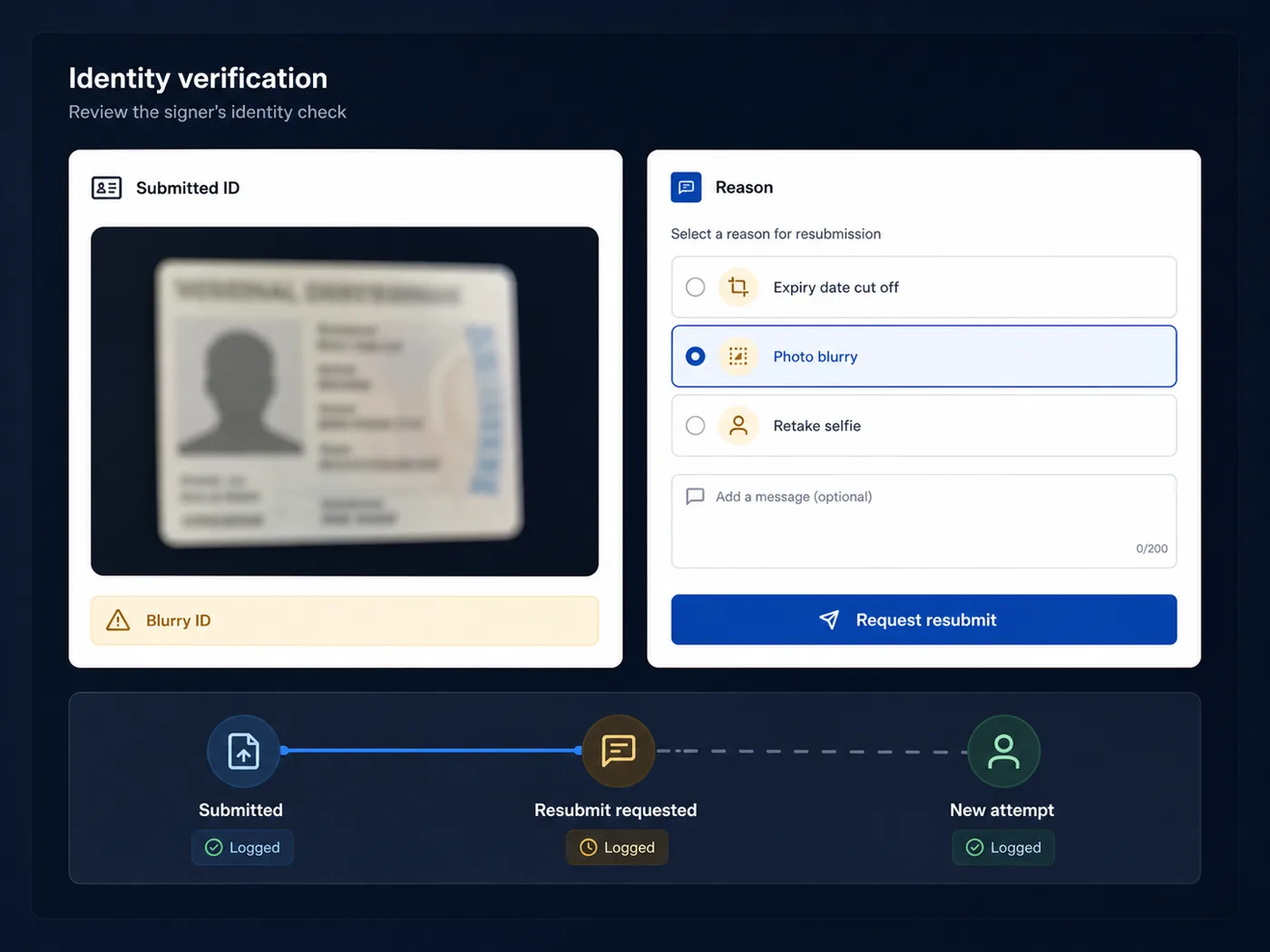
Blurry photo? Send it back in one click.

Nobody's first attempt is perfect. A licence catches the flash, a selfie crops the chin. Instead of failing the signer with an error code, you return it with a plain-language reason — "the expiry date is cut off" — and they simply try again.

Every round trip is logged, so the record shows not just that identity was confirmed, but exactly how many attempts it took and why.

Plain-English reasonsUnlimited retriesEach round logged
Read the walkthrough
Host returning an unusable ID photo with a reason
▶ Video

Identity, intent, integrity

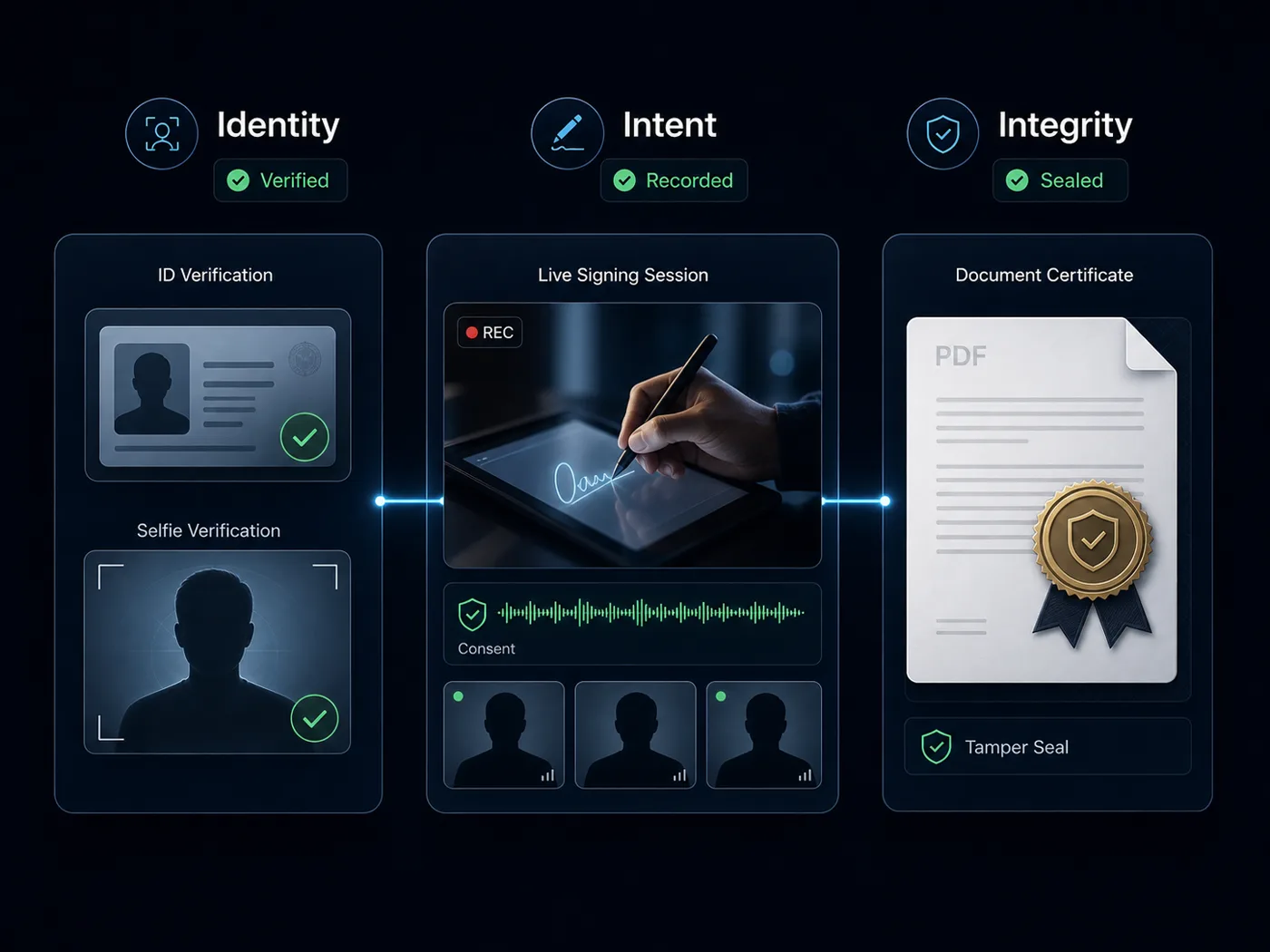
The three things evidence is actually made of

An ID check on its own proves who was there. Pair it with a recorded live session — where consent is spoken out loud — and a tamper-sealed PDF, and you have the full set: identity, intent, and integrity.

That is the difference between a signature you can point to and a signature you can defend.

Recorded sessionSpoken consentSealed result
How the seal works
Identity check, recorded consent and sealed document together
▶ Video

Audit & privacy

Held only as long as it has a purpose

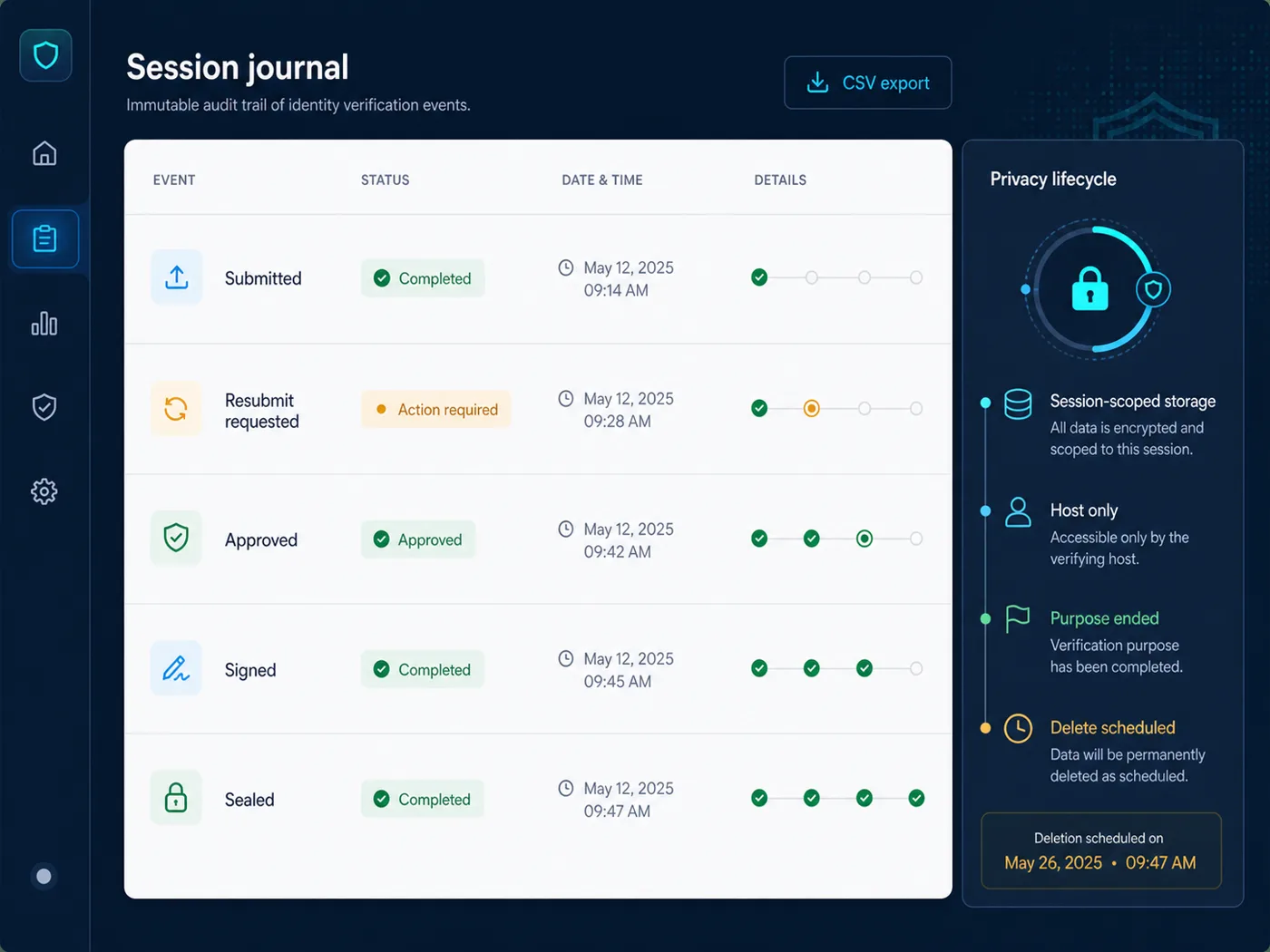
Every verification event — submitted, approved, resubmit requested — is written to the Audit Report with who did it and when, and exports to CSV with the rest of the record.

The ID images themselves are stored under a session-scoped path, served only to the authenticated host, and destroyed when the verification purpose ends. Collect what the job needs, keep it while the job needs it, then let it go — the principle behind PIPEDA and Quebec's Law 25, and the reason we publish a Privacy Impact Assessment.

Session-scoped storageHost-only accessDestroyed after purposeCSV Audit Report
PIPEDA & Law 25
Audit Report listing every identity verification event
▶ Video

Why this is different

Built for the person running the signing

Identity platforms are built for engineering teams verifying strangers at scale. This is built for the property manager, broker, agent or attorney checking one person, today, in a room they are already hosting.

👁️

You see the evidence

The ID, the selfie and the live face, side by side. Not a confidence score you have to take on faith and cannot explain later.

🎥

Checked against live video

The person is on camera while you review. A stolen ID and a stolen selfie still have to get past a live face.

🔒

A real gate, not a warning

Required mode locks the sign button. The check cannot be skipped, ignored or clicked past by an impatient signer.

💸

No per-verification bill

Included with Pro at $9.99/month. Dedicated identity vendors quote per check on an annual contract — fine at scale, absurd for six signings a month.

Nothing to integrate

No SDK, no API keys, no sandbox, no developer. Turn it on for a session and it is running.

🧾

The check is in the record

Verification events sit in the same Audit Report as the signing itself and export together — one evidence file, not two systems to reconcile.

🔁

Humane failure

A bad photo gets a sentence explaining what to fix, not a rejection. Fewer abandoned signings, fewer support calls.

🗑️

Deleted when done

ID images are session-scoped, host-only, and destroyed when the purpose ends. Holding identity documents forever is a liability, not a feature.

🇨🇦

Canadian-built

Designed around PIPEDA and Quebec's Law 25, with a published Privacy Impact Assessment rather than a compliance page that says "trust us".

Honest comparison

When to use this — and when not to

We are not trying to be Jumio. If you are onboarding ten thousand strangers a month, buy a dedicated identity platform. If you are verifying the people you are already meeting to sign a document, this is the better tool.

What you needEZ PDF Editor ProDedicated identity platform
ID document + selfie captureIncludedIncluded
Checked against a live human on videoYes — that is the modelRarely; usually async
Automated document forensics & liveness scoringNo — you review it yourselfYes, their core strength
Watchlist / AML screeningNot offeredUsually available
Tied directly to a document signingSame session, same recordSeparate system to integrate
Engineering work to deployNoneSDK / API integration
Pricing model$9.99/mo, unlimited checksPer verification, annual contract
Good for thousands of checks a monthNo — built for hosted signingsYes, built for scale

Right-hand column describes the common shape of dedicated identity-verification vendors as of August 2026, generalised on purpose — capabilities and pricing vary by vendor and tier. Everything in the EZ PDF Editor column is live today.

Pricing

Unlimited checks, one flat price

Identity verification lives inside the Video Signing Room, which is part of Pro. There is no per-check fee and no annual commitment.

Free
$0
Editing, filling and basic e-signature — without ID checks.
  • 2 signature requests / month
  • Tamper-sealed PDF + certificate
  • Full PDF editor, no watermark
  • Free public seal verification
Start With E-Signature
Identity verification is not part of the free plan.
Pro
$9.99/mo
For property managers, mortgage brokers, real estate agents and attorneys — and their clients.
  • Unlimited identity checks
  • Required or optional per session
  • Video Signing Room — live & recorded
  • Unlimited signature requests
  • Up to 4 signers per document
  • Audit Report + CSV export
  • Priority processing & support
Go Pro
No per-check fee. Cancel anytime.
Business
Custom
Brokerages, firms and teams verifying at volume.
  • Everything in Pro
  • Shared team templates
  • Branded signing pages
  • Consolidated audit trail
  • Onboarding & SLA
Talk to us
Tell us your volume and we will quote it plainly.

Questions

Good to know

Is this an automated ID-scanning service?

No, and that is deliberate. There is no black-box authenticity score, no liveness algorithm and no watchlist screening. You see the ID, the selfie and the live person, and you make the call — and the record shows who approved, when, and on what basis. If you need automated document forensics at scale, a dedicated identity platform is the right tool.

What ID can a signer use?

Any government-issued photo ID — a driver's licence, a passport, a provincial ID card. They photograph it in the browser with the device they already have.

What happens if the photo is unusable?

You send it back with a plain-language reason and they resubmit. The loop is part of the flow, not an error state, and every round is logged.

Can I make ID checks optional?

Yes — it is a per-session setting. Required locks the sign button until you approve. Optional lets guests join and sign without a check. Guests always see which mode applies to them.

What happens to the ID images?

They are stored server-side under a session-scoped path, served only to the authenticated host, and destroyed when the verification purpose ends. Details are in the privacy policy and the Privacy Impact Assessment.

Does the signer need an account?

No. They open their link, submit the ID and selfie, and sign — no app, no account, no watermark. Only the host needs a Pro account.

Does the check end up in the evidence?

Yes. Submitted, approved and resubmit-requested events all land in the Audit Report, which exports to CSV, and the signing itself produces a tamper-sealed PDF anyone can verify.

Is a verified e-signature legally stronger?

Canadian law recognises electronic signatures broadly; what decides a dispute is the evidence behind one. An ID check, a recorded session and a sealed file make that evidence considerably harder to argue with. This is general information, not legal advice.
Stop hoping it was really them.

Turn on identity checks for your next signing — government ID, selfie, live face, your approval, all in the record.

Included with Pro — $9.99/mo, unlimited checks. See pricing.

Keep reading